
- Thread starter
- #1
Hello all!
This is my first post here and I am new this year new to Tacos (25' Trailhunter). So far so good!
I wanted to compile a thorough and complete post (including info I have not seen anywhere else) about 4th Gen Tacoma Audio. There is more to this than what you might be thinking I promise, so keep reading to the end.... if you can. In the interest of trying to help everyone get the best audio out of their Tacoma (JBL or otherwise), the below are some things I have read and tried, thought of myself and tried, discovered by accident, and just experimented with, in order to get to where, what I believe to be, a decent audio experience without a complete overhaul of the system.
(Unofficial #1 point) To start off, I have personally listened to both the standard system, and the premium JBL, but ALSO the same exact JBL system in both a Hybrid and a Non-Hybrid Gas model. THE AUDIO IS DRAMATICALLY BETTER - right from the start in the hybrid versions. Unfortunately this "better" baseline starting point, is where everything below has been applied to, because that's what I own, but it is applicable to ALL. Here is my list and descriptions of things you can do to get the best out of your sound.
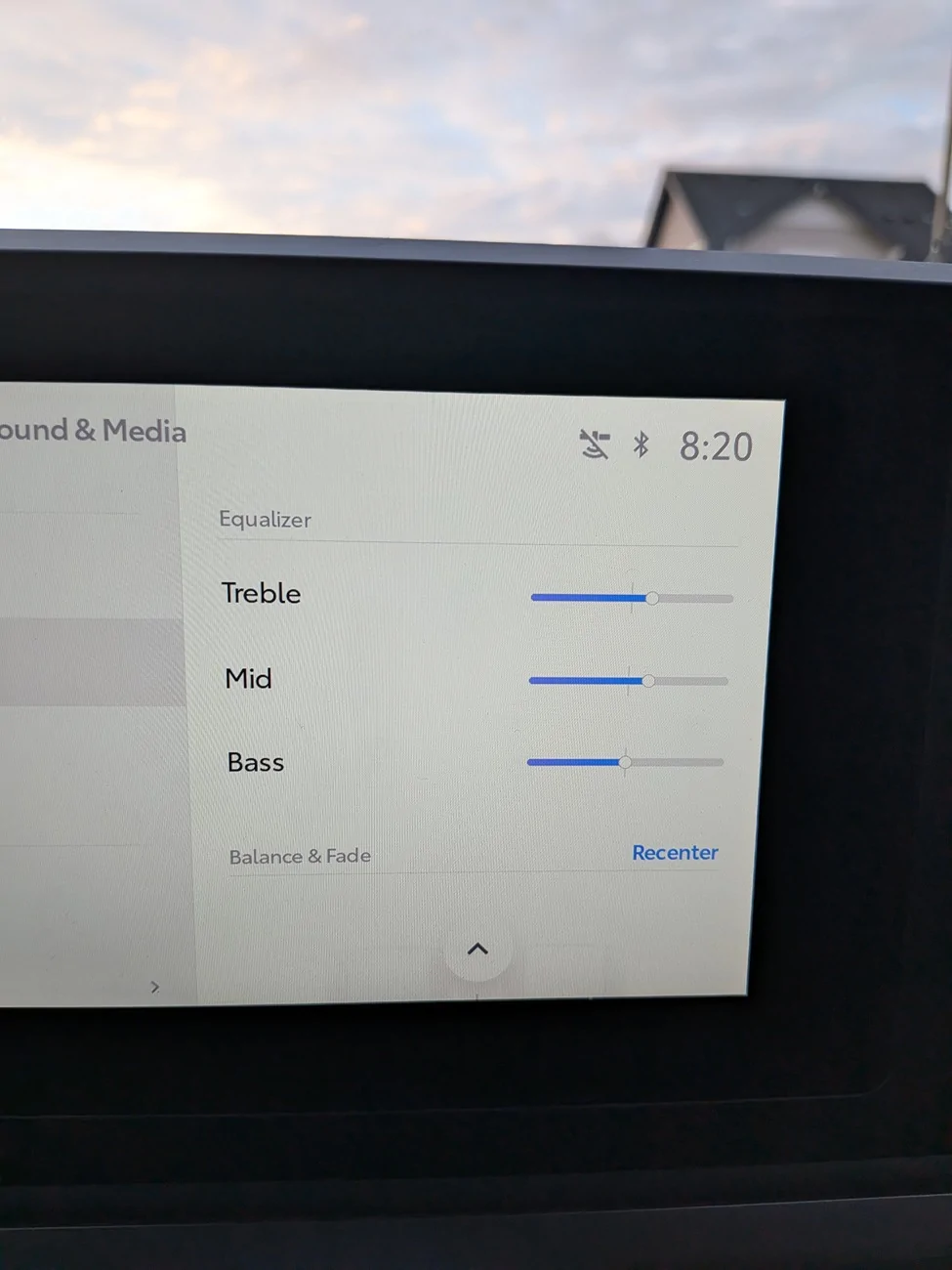
1. Lets start with something that "should" be rather obvious. Adjusting the: Treble, Mids, and Bass. Worth noting that the Mids tend to very easily be over emphasized in these trucks and can easily sound shrill and cause listening fatigue. For me personally I have the bass all the way up, treble one click below max, and the Mids one click above middle. This will depend on your individual tastes but play around with it. Go max on each individually or all the way down and see what you notice and fine tune it from there until you are as "happy as you can be" LOL.
2. Something that may honestly not be thought of and should be! Your Seating Position. In home-audio, we know sound stage can vary greatly depending on where the listener is positioned. Well, it shouldn't be so surprising that the position of our ears: forward, back, higher, or lower int he vehicle, will have the potential to dramatically alter what we hear, no matter what settings we are using. Try this too by just messing around with it. Try just moving your head around and adjusting your seat to where your head naturally ends up there when sitting normally. Driving comfort clearly plays a big role here, but if you can find a way to adust the seat to a happy medium of height, support, reaching everthing, thigh height, tilt, etc.... you may also find a much better listening experience. For me, sitting lower and back, opened up the sound stage and made the center chanel a little less overpowering and less harsh. Also brought he rear channels out a bit into the mix. Sound became more balanced.
3. This is a BIG ONE!!!!! The Carista OBD device with access to hidden menus. There are 4 setting I am going to point you towards but 2 of them can make a WORLD of difference. Th first two Ill know out real quick and these are the "volume: sensitivity of the mic and the speakers themselves. I found this to make a "small" difference, but it is there and worth toying around with to get a little more volume for your callers on the other end, and also more out of your volume knob. Now the other 2 are far greater in the ability to help your system out. ANC for road noise and Engine sound played through the speakers. Why this matters is because: 1. speakers can only do so much... and be able to do that WELL. So, the more we ask them to do, the less efficient they are in the one thing we really want them good at... MUSIC. and 2. The low frequency played to eliminate road noise could in theory reduce those same frequencies in your music, as well as put a pretty big strain on your subwoofer and limiting your systems bass output. This is applicable to non-JBL systems as well. Help your speakers do less tasks and do better at playing your preferred tunes. This made a big difference for me. (The Carista device has a subscription fee that you can just pay for one month and then cancel. Your setting stay! I have tested this. Unless you wish to keep it for all the other valuable info like live coolant temp, etc)
4. Another BIG one. The Audio SOURCE. Where is your system getting the audio from? Radio, physical plug, bluetooth? AND>>>>>>>> What is the audio QUALITY coming from that device/app? So lets be honest and say most of us are likely just streaming from our phones unless we are listening to the radio. Its a matter of convenience and access to a huge library of media. I have done everyone the favor of testing 5 different apps and all the different quality options they have to offer. You will see there are trade-offs for each one of them. A clear winner for quantity and a very clear winner for Quality as well.
1. YouTube Music: this app for the sheer amount of content available, completely crushes every single other app, even Spotify (I'm not counting podcasts and other, just music). It also excels in the categorization of styles and genres that allows it to seemingly find an endless stream of new songs and titles to play back to back as to never run out of something to play that lines right up with what you started with. That said, the Audio could be described as somewhat flat, muffled, and overall unimpressive compared to everyone else, even at the highest quality setting. I will say that it maintains better warmth in tone than some of the others, and less abrasive. You will see me mention that in their notes.
2. Amazon Music: This one ranks second for Lowest audio quality, but is a noticeable improvement in clarity and detail compared to YTM. The library is still quite impressive and finding new titles rather easy. The app is also user friendly, although not as good as YTM in that regard. The audio is less warm, and with that improved clarity, we also lose some of the balance and sound stage.
3. Spotify: Here we take another increase in audio quality and the top level the app offers, is significantly more detailed than the other 2 so far. The sound stage is also better overall than AM, however at the highest quality setting, can be a tad bright for my listening, overemphasizing the highs and losing some of the authority I like in the lower notes. The app is still not as good as YTM at finding new music or keeping my listening to a specific song style or genre, and I really find this disappointing. It just can't match the reach of what is available on YTM.
4. TIDAL: We take a HUGE step up in quality with zero doubt, in just about every single way. Clarity, sound stage, warmth, detail, all much much better. The music really comes to life in comparison. We do lose some of the variety, and not as much content, but the app still does a pretty decent job of finding and playing a good playlist, and categorizing it accordingly. I really like this app, but I WISH is either had the scope of YTM, or matched the quality of our last app on the list.
5. Qobuz: Bar-none the winner by a mile in audio quality. What TIDAL does best, this does it better in every category, but with increased fullness and balance that is lacking in TIDAL. You simply cannot do better. Playing the same track back to back here vas any of the other 4, leaves the other in the dust. However, this app by far has the lowest amount of titles, and their categorizing and indexing flat out sucks. You have to know what you want to listen to, go find it, and play it. Or, create your own playlists over time. Also note: Center channel is the least overpowered using this app.
All that said, you can always download and connect a flash driver or other device via cord, directly to the unit as well.
5. On top of the source, it is important to note that added adjustability and refinement can really help out bigtime. So here we have External Equalizer aps like Poweramp. These can take what's good and make it soooo much better, plus help us remove unwanted high areas that the factory system tends to default to. This app allows me to adjust the "gain" on my music so my system has more volume, this allows me to really tailor the audio much more than the music app's adjustments or otherwise. Worth noting that not all music apps allow control over their output by other apps. TIDAL for example DOES NOT, which is unfortunate because the one or two things lacking might be fixable with the audio tuning provided here.
6. Last but not least! A plug and play external amp like Beat-Sonic. I ordered one of these little things and through some mild hassle, was able to install it without any modification or altering to factory wiring or other. This made a NOTABLE difference and for how much I enjoy my music, it was well worth doing, especially when added to all of the above. Why it really works is becuase we have to understand that factory systems will "hold back" power as you increase the volume. They do this to protect the speakers and ensure nothing gets maxed out, Well, this changes the audio profile more and more as the volume goes up. The added power this little amp provides, allows you to listen at "your max listening level", at a much lower volume "setting" on the dash. Your audio profile is therefore held in tact, and it really helps to maintain the clarity and details in the music as well as the bass! Seriously. It also allowed me to adjust the audio to the rear speakers by 1 notch to help better balance the sound stage and reduce listening fatigue, but not lose soooo much audio potential like I did as stock.
Well, thats the list! If you made it this far, I congratulate you. Drop a comment and let me know if this helped you. If you found it over the top and boring, you are probably not who I intended to help - just saying.
This is my first post here and I am new this year new to Tacos (25' Trailhunter). So far so good!
I wanted to compile a thorough and complete post (including info I have not seen anywhere else) about 4th Gen Tacoma Audio. There is more to this than what you might be thinking I promise, so keep reading to the end.... if you can. In the interest of trying to help everyone get the best audio out of their Tacoma (JBL or otherwise), the below are some things I have read and tried, thought of myself and tried, discovered by accident, and just experimented with, in order to get to where, what I believe to be, a decent audio experience without a complete overhaul of the system.
(Unofficial #1 point) To start off, I have personally listened to both the standard system, and the premium JBL, but ALSO the same exact JBL system in both a Hybrid and a Non-Hybrid Gas model. THE AUDIO IS DRAMATICALLY BETTER - right from the start in the hybrid versions. Unfortunately this "better" baseline starting point, is where everything below has been applied to, because that's what I own, but it is applicable to ALL. Here is my list and descriptions of things you can do to get the best out of your sound.
1. Lets start with something that "should" be rather obvious. Adjusting the: Treble, Mids, and Bass. Worth noting that the Mids tend to very easily be over emphasized in these trucks and can easily sound shrill and cause listening fatigue. For me personally I have the bass all the way up, treble one click below max, and the Mids one click above middle. This will depend on your individual tastes but play around with it. Go max on each individually or all the way down and see what you notice and fine tune it from there until you are as "happy as you can be" LOL.
2. Something that may honestly not be thought of and should be! Your Seating Position. In home-audio, we know sound stage can vary greatly depending on where the listener is positioned. Well, it shouldn't be so surprising that the position of our ears: forward, back, higher, or lower int he vehicle, will have the potential to dramatically alter what we hear, no matter what settings we are using. Try this too by just messing around with it. Try just moving your head around and adjusting your seat to where your head naturally ends up there when sitting normally. Driving comfort clearly plays a big role here, but if you can find a way to adust the seat to a happy medium of height, support, reaching everthing, thigh height, tilt, etc.... you may also find a much better listening experience. For me, sitting lower and back, opened up the sound stage and made the center chanel a little less overpowering and less harsh. Also brought he rear channels out a bit into the mix. Sound became more balanced.
3. This is a BIG ONE!!!!! The Carista OBD device with access to hidden menus. There are 4 setting I am going to point you towards but 2 of them can make a WORLD of difference. Th first two Ill know out real quick and these are the "volume: sensitivity of the mic and the speakers themselves. I found this to make a "small" difference, but it is there and worth toying around with to get a little more volume for your callers on the other end, and also more out of your volume knob. Now the other 2 are far greater in the ability to help your system out. ANC for road noise and Engine sound played through the speakers. Why this matters is because: 1. speakers can only do so much... and be able to do that WELL. So, the more we ask them to do, the less efficient they are in the one thing we really want them good at... MUSIC. and 2. The low frequency played to eliminate road noise could in theory reduce those same frequencies in your music, as well as put a pretty big strain on your subwoofer and limiting your systems bass output. This is applicable to non-JBL systems as well. Help your speakers do less tasks and do better at playing your preferred tunes. This made a big difference for me. (The Carista device has a subscription fee that you can just pay for one month and then cancel. Your setting stay! I have tested this. Unless you wish to keep it for all the other valuable info like live coolant temp, etc)
4. Another BIG one. The Audio SOURCE. Where is your system getting the audio from? Radio, physical plug, bluetooth? AND>>>>>>>> What is the audio QUALITY coming from that device/app? So lets be honest and say most of us are likely just streaming from our phones unless we are listening to the radio. Its a matter of convenience and access to a huge library of media. I have done everyone the favor of testing 5 different apps and all the different quality options they have to offer. You will see there are trade-offs for each one of them. A clear winner for quantity and a very clear winner for Quality as well.
1. YouTube Music: this app for the sheer amount of content available, completely crushes every single other app, even Spotify (I'm not counting podcasts and other, just music). It also excels in the categorization of styles and genres that allows it to seemingly find an endless stream of new songs and titles to play back to back as to never run out of something to play that lines right up with what you started with. That said, the Audio could be described as somewhat flat, muffled, and overall unimpressive compared to everyone else, even at the highest quality setting. I will say that it maintains better warmth in tone than some of the others, and less abrasive. You will see me mention that in their notes.
2. Amazon Music: This one ranks second for Lowest audio quality, but is a noticeable improvement in clarity and detail compared to YTM. The library is still quite impressive and finding new titles rather easy. The app is also user friendly, although not as good as YTM in that regard. The audio is less warm, and with that improved clarity, we also lose some of the balance and sound stage.
3. Spotify: Here we take another increase in audio quality and the top level the app offers, is significantly more detailed than the other 2 so far. The sound stage is also better overall than AM, however at the highest quality setting, can be a tad bright for my listening, overemphasizing the highs and losing some of the authority I like in the lower notes. The app is still not as good as YTM at finding new music or keeping my listening to a specific song style or genre, and I really find this disappointing. It just can't match the reach of what is available on YTM.
4. TIDAL: We take a HUGE step up in quality with zero doubt, in just about every single way. Clarity, sound stage, warmth, detail, all much much better. The music really comes to life in comparison. We do lose some of the variety, and not as much content, but the app still does a pretty decent job of finding and playing a good playlist, and categorizing it accordingly. I really like this app, but I WISH is either had the scope of YTM, or matched the quality of our last app on the list.
5. Qobuz: Bar-none the winner by a mile in audio quality. What TIDAL does best, this does it better in every category, but with increased fullness and balance that is lacking in TIDAL. You simply cannot do better. Playing the same track back to back here vas any of the other 4, leaves the other in the dust. However, this app by far has the lowest amount of titles, and their categorizing and indexing flat out sucks. You have to know what you want to listen to, go find it, and play it. Or, create your own playlists over time. Also note: Center channel is the least overpowered using this app.
All that said, you can always download and connect a flash driver or other device via cord, directly to the unit as well.
5. On top of the source, it is important to note that added adjustability and refinement can really help out bigtime. So here we have External Equalizer aps like Poweramp. These can take what's good and make it soooo much better, plus help us remove unwanted high areas that the factory system tends to default to. This app allows me to adjust the "gain" on my music so my system has more volume, this allows me to really tailor the audio much more than the music app's adjustments or otherwise. Worth noting that not all music apps allow control over their output by other apps. TIDAL for example DOES NOT, which is unfortunate because the one or two things lacking might be fixable with the audio tuning provided here.
6. Last but not least! A plug and play external amp like Beat-Sonic. I ordered one of these little things and through some mild hassle, was able to install it without any modification or altering to factory wiring or other. This made a NOTABLE difference and for how much I enjoy my music, it was well worth doing, especially when added to all of the above. Why it really works is becuase we have to understand that factory systems will "hold back" power as you increase the volume. They do this to protect the speakers and ensure nothing gets maxed out, Well, this changes the audio profile more and more as the volume goes up. The added power this little amp provides, allows you to listen at "your max listening level", at a much lower volume "setting" on the dash. Your audio profile is therefore held in tact, and it really helps to maintain the clarity and details in the music as well as the bass! Seriously. It also allowed me to adjust the audio to the rear speakers by 1 notch to help better balance the sound stage and reduce listening fatigue, but not lose soooo much audio potential like I did as stock.
Well, thats the list! If you made it this far, I congratulate you. Drop a comment and let me know if this helped you. If you found it over the top and boring, you are probably not who I intended to help - just saying.
Sponsored