
Sponsored

disabling DCM / telematics in 2025 Taco

Singha

Trailhunter
Member
First Name
Siri
Joined
Aug 28, 2025
Threads
1
Messages
14
Reaction score
17
Location
NY
Vehicle(s)
25 Taco TrailHunter, 07 FjC, 00 100series, 04 Lx470 (100series), 88 Samurai TT
Has this caused anyones remote start via the key fob to stop working? Toyota claims the DCM is required for remote start to work at all even from the key fob as without the 10 year free trial or paid subscription to Connected services, you will lose access to remote start.

I Installed the AHH connector and NOW my remote start VIA key FOB is also not working. I have confirmed it. And I ran a full scan, codes are showing that there is no communication with the Telematic. No other codes or issue. I would like to have my remote start back with out Toyota getting my driving info.
Sponsored


 

maxx075

TRD Off-Road
Well-known member
Joined
Apr 24, 2024
Threads
6
Messages
1,243
Reaction score
1,487
Location
FL
Vehicle(s)
2024 TRD Off Road
I Installed the AHH connector and NOW my remote start VIA key FOB is also not working. I have confirmed it. And I ran a full scan, codes are showing that there is no communication with the Telematic. No other codes or issue. I would like to have my remote start back with out Toyota getting my driving info.
Seems from this older Tundra Forum thread that the DCM functioning correctly is required to use the key fob to start. Though the consent to use Connected Data services to use the fob remote start seems to have been discontinued.

Unless declining the Connected Services on the newer models is just a placebo (honestly wouldn't be surprised). And you're now seeing the actual DCM not being used.

Definitely a link from the DCM to the ECU that the key fob is using though.
 

fredygump

SR5
Active member
First Name
Darren
Joined
Aug 1, 2026
Threads
4
Messages
28
Reaction score
27
Location
Minnesota
Vehicle(s)
2026 Tacoma SR5, 2016 VW GTI
Seems from this older Tundra Forum thread that the DCM functioning correctly is required to use the key fob to start. Though the consent to use Connected Data services to use the fob remote start seems to have been discontinued.

Unless declining the Connected Services on the newer models is just a placebo (honestly wouldn't be surprised). And you're now seeing the actual DCM not being used.

Definitely a link from the DCM to the ECU that the key fob is using though.
I am confident that your vehicle is constantly/ regularly transmitting data to Toyota no matter what you do, unless you disable it yourself.

Their legal justification/ argument is to point out that a person who does not set up an account is identified as a "guest". Because the vehicle is operating under a "guest" user, the data they collect is not "personal data". It is "anonymous" data, not personally identifiable!

I am pretty sure that an insurance company (or other company?) that is buying driving data doesn't care if the driver is identified or not. If they see a driving event they don't like, they could penalize you, whether or not it was actually you. So yeah, even though it is not technically "personal data", the data is connected to the owner of the vehicle.

The data becomes "personal data" when you identify yourself as the driver! And when you identify yourself (i.e. setting up the app), you consent to the tracking stuff.

Once you create an account, or a family creates multiple accounts for each driver, then Toyota can separate the driving data into individual reports for each driver. Isn't that nice of them?

I do not see how Toyota has any ability (or incentive) to remotely disable the transmission of cellular data from your vehicle. They just receive it all of the time. If you don't like that, you have to stop the transmission at your vehicle.
 
Last edited:

maxx075

TRD Off-Road
Well-known member
Joined
Apr 24, 2024
Threads
6
Messages
1,243
Reaction score
1,487
Location
FL
Vehicle(s)
2024 TRD Off Road
I am confident that your vehicle is constantly/ regularly transmitting data to Toyota no matter what you do, unless you disable it yourself.

Their legal justification/ argument is to point out that a person who does not set up an account is identified as a "guest". Because the vehicle is operating under a "guest" user, the data they collect is not "personal data". It is "anonymous" data, not personally identifiable!

I am pretty sure that an insurance company (or other company?) that is buying driving data doesn't care if the driver is identified or not. If they see a driving event they don't like, they could penalize you, whether or not it was actually you. So yeah, even though it is not technically "personal data", the data is connected to the owner of the vehicle.

The data becomes "personal data" when you identify yourself as the driver! And when you identify yourself (i.e. setting up the app), you consent to the tracking stuff.

Once you create an account, or a family creates multiple accounts for each driver, then Toyota can separate the driving data into individual reports for each driver. Isn't that nice of them?

I do not see how Toyota has any ability (or incentive) to remotely disable the transmission of cellular data from your vehicle. They just receive it all of the time. If you don't like that, you have to stop the transmission at your vehicle.
I disabled my DCM, so this isn't an issue for me.

Was just pointing out that there's definitely a connection between the key fob remote start and the DCM.
 

iron.head

TRD Off-Road Premium
Well-known member
Joined
May 26, 2025
Threads
1
Messages
51
Reaction score
8
Location
Michigan
Vehicle(s)
2025 Tacoma TRD Off-Road Premium
Could somebody confirm if autoharnesshouse.com
Toyota Vehicle - Telematics DCM Bypass kit

is breaking the microphone function? Thank you.
 

Sponsored

fredygump

SR5
Active member
First Name
Darren
Joined
Aug 1, 2026
Threads
4
Messages
28
Reaction score
27
Location
Minnesota
Vehicle(s)
2026 Tacoma SR5, 2016 VW GTI
Could somebody confirm if autoharnesshouse.com
Toyota Vehicle - Telematics DCM Bypass kit

is breaking the microphone function? Thank you.
I suspect you somewhat misunderstand the situation.

The autoharnesshouse.com kit does not deactivate/disconnect the DCM, because DCM is deactivated when you unplug the cables or pull the fuse. You do not need to buy anything to do the disconnect.

What the kit does is it restores the functions that you would otherwise lose by just disconnected the DCM.

So yes, you need the kit if you want to keep those functions.
 

iron.head

TRD Off-Road Premium
Well-known member
Joined
May 26, 2025
Threads
1
Messages
51
Reaction score
8
Location
Michigan
Vehicle(s)
2025 Tacoma TRD Off-Road Premium
I suspect you somewhat misunderstand the situation.

The autoharnesshouse.com kit does not deactivate/disconnect the DCM, because DCM is deactivated when you unplug the cables or pull the fuse. You do not need to buy anything to do the disconnect.

What the kit does is it restores the functions that you would otherwise lose by just disconnected the DCM.

So yes, you need the kit if you want to keep those functions.

I went with this solution (bought it, even though truck is still on the way): https://www.autoharnesshouse.com/store/AHH-DCM77

This supposedly works and no power goes to the DCM at that point, so the cellular modem is genuinely dead.

EDIT: This does not seem to work properly. May try it again but it seems the microphone does not work with it. Same behavior as pulling the DCM fuse.
@fredygump if you see Page 1. Microphone did not work with the harness.
 

cepstralspike

Member
First Name
cepstral
Joined
Aug 29, 2026
Threads
0
Messages
6
Reaction score
0
Location
philadelphia
Vehicle(s)
2025 Camry Hybrid AWD
Only one poster has mentioned the AHH bypass didn't work for him. I couldn't see if he updated his post yet.
AHH bypass only partially worked for me. 2025 Camry hybrid awd. Speaker ok. BT microphone shows no response on back screen. They sent me a new harness. Reinstall scheduled for September 10. I'm thinking if that fails an alternative method would be to plug in 50 ohm terminators to each of the three antenna leads. that should cause the DCM to behave as though the car is in a dead zone(no 4g or 5g detected). Unfortunately that would consume a little more battery power. So for cars parked a long time that could be a problem. Then of course there's the problem of finding a properly fitting 50 ohm Terminator for each of those 3 sockets.
 

Sponsored

cepstralspike

Member
First Name
cepstral
Joined
Aug 29, 2026
Threads
0
Messages
6
Reaction score
0
Location
philadelphia
Vehicle(s)
2025 Camry Hybrid AWD
I Installed the AHH connector and NOW my remote start VIA key FOB is also not working. I have confirmed it. And I ran a full scan, codes are showing that there is no communication with the Telematic. No other codes or issue. I would like to have my remote start back with out Toyota getting my driving info.
Right. That is expected. I had https://www.compustar.com/remotes/pro-2wg18-no-lte/ installed. It will be good for warming up the car in the winter. But it's kind of a nuisance because as soon as you open the door the car turns off. (I think)That's because the switch over would require a working telematics unit that talks to Toyota. But it has good range two football fields at least. I think it works via spread spectrum FM frequencies.
 

cepstralspike

Member
First Name
cepstral
Joined
Aug 29, 2026
Threads
0
Messages
6
Reaction score
0
Location
philadelphia
Vehicle(s)
2025 Camry Hybrid AWD
Just installed the two plugs from the kit from Auto harness house.
Super easy.
I wrapped the upper part of the handle with electrical tape (two wraps). To reduce the chance of marking it up.
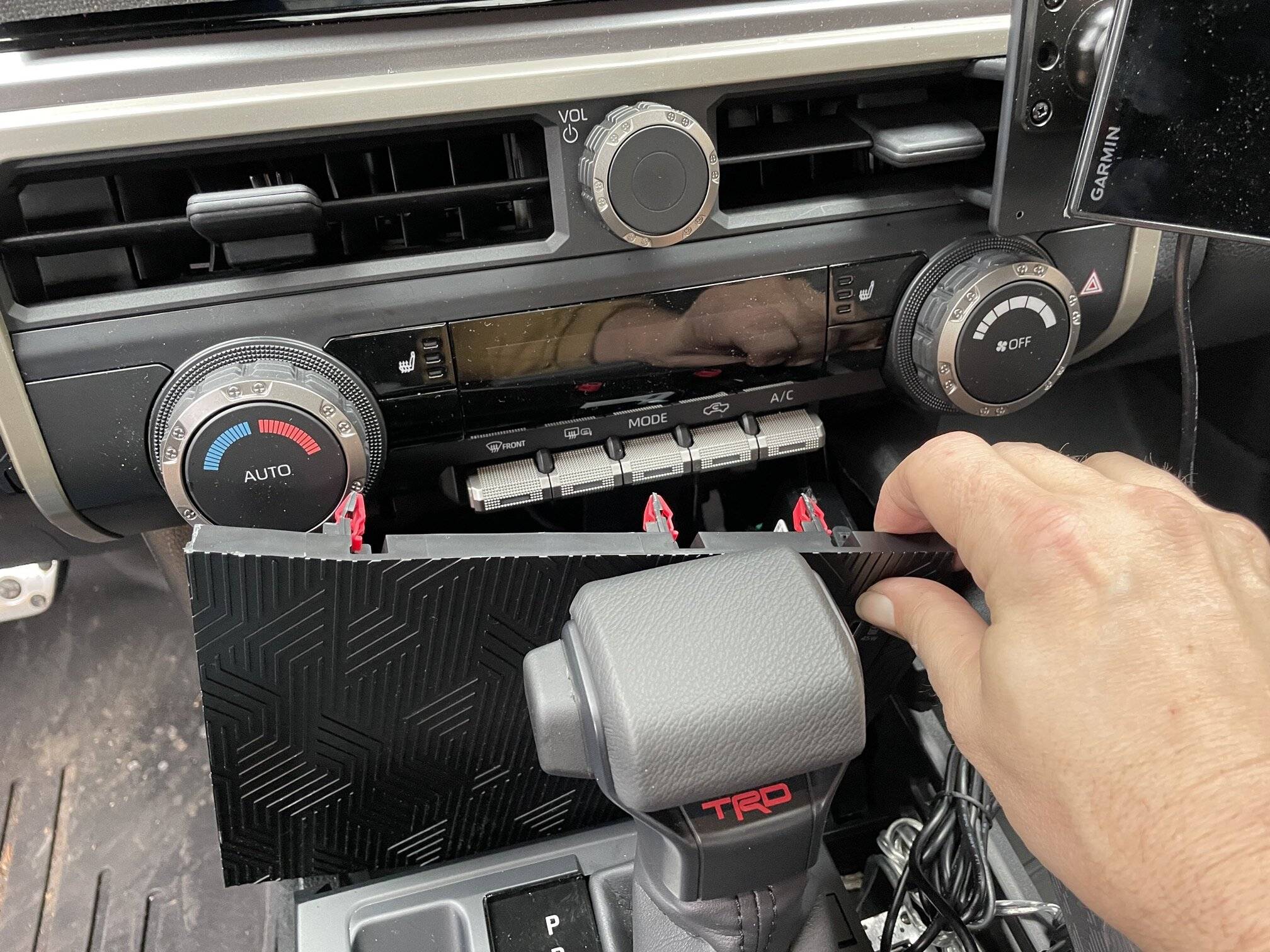
Used a small "L" pic to slowly pry the charging pad from the top side (right below the HVAC controls). Prying across the top of it. Then put the truck in neutral to make more room to work. Slide the top of that console toward the rear of the truck and slide it out. Unplug the 3 connectors (Wireless charger, USB C, and the cig). Use the tip from the pic and push the small white tabs (two) to loosen the harness strap/clip tie down. Take a long flat small head screw driver and push the grey (big plug) lock in, use the same screw driver and use the tip to slowly pry the plug away from the DCM (go back and fourth on either side of the locking tab). Should unplug from the unit easily. Use the long screw driver to also push the locking tab on the small plug. The plug can easily be pulled down and out of the DCM with your hand.
Plug the Auto Harness plugs and your done.
Hardest and took the longest was trying to get the wireless console back in under the HVAC controls and into place. Easy coming out, so pay attention how you work it out to clear the HVAC controls. Took a whole 10min to get it back into it spot safely without scratching up anything and breaking the HVAC buttons.
So your Bluetooth speaker worked fine? That's good I was looking for full working confirmation from someone with a 2025 model. Maybe I just got a bad harness. Or maybe my mechanic did something wrong on the install.
 

maxx075

TRD Off-Road
Well-known member
Joined
Apr 24, 2024
Threads
6
Messages
1,243
Reaction score
1,487
Location
FL
Vehicle(s)
2024 TRD Off Road
BT mic failed for me too.
I have zero issues. The DCM itself is "dead" as it has zero connection to power or communication with the ECU.

My speakers work fine (all of them) and microphone capabilities are 100% intact as I use them every day.

The harness itself emulates a "no signal" condition back to the ECU, but is not connected in any way to the truck.
 

cepstralspike

Member
First Name
cepstral
Joined
Aug 29, 2026
Threads
0
Messages
6
Reaction score
0
Location
philadelphia
Vehicle(s)
2025 Camry Hybrid AWD
Posting a how-to on grounding out the antennas used by the DCM telematics module.

This post is not a debate about the puposes of telematics communicating data back to a toyota service center ,or legality of same -- only a how-to for those interested.

Background - why bother?
- All recent toyotas have a always-on cellular connection to Toyota corporate via thee internet. This enables lots of data reporting and remote monitoring & control of the vehicle. This includes GPS location, speed and other data. Maybe you don't care, maybe you feel the pros of being connected outweight the cons; but some people don't want this data being sent at all.

What data gets sent?
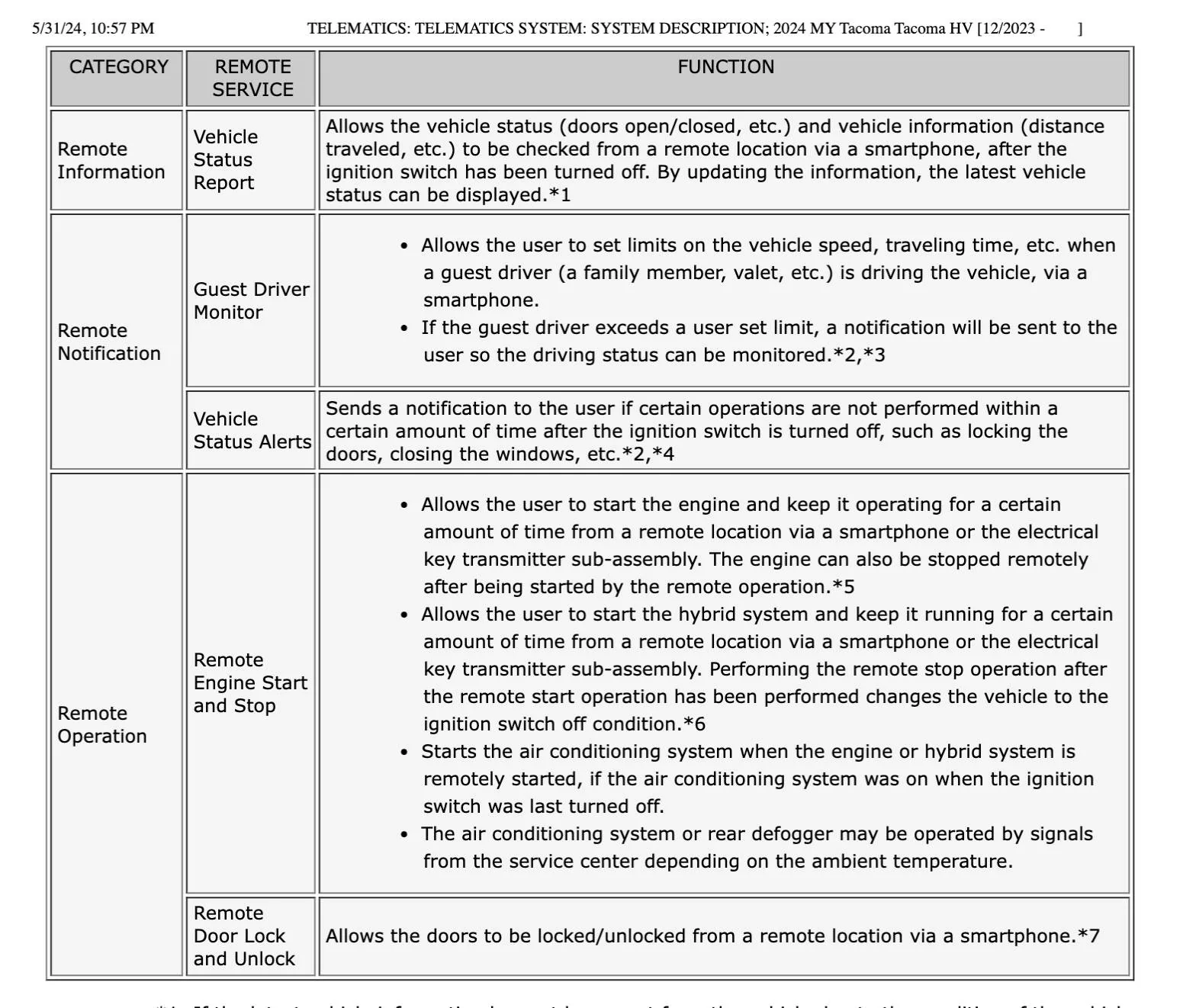
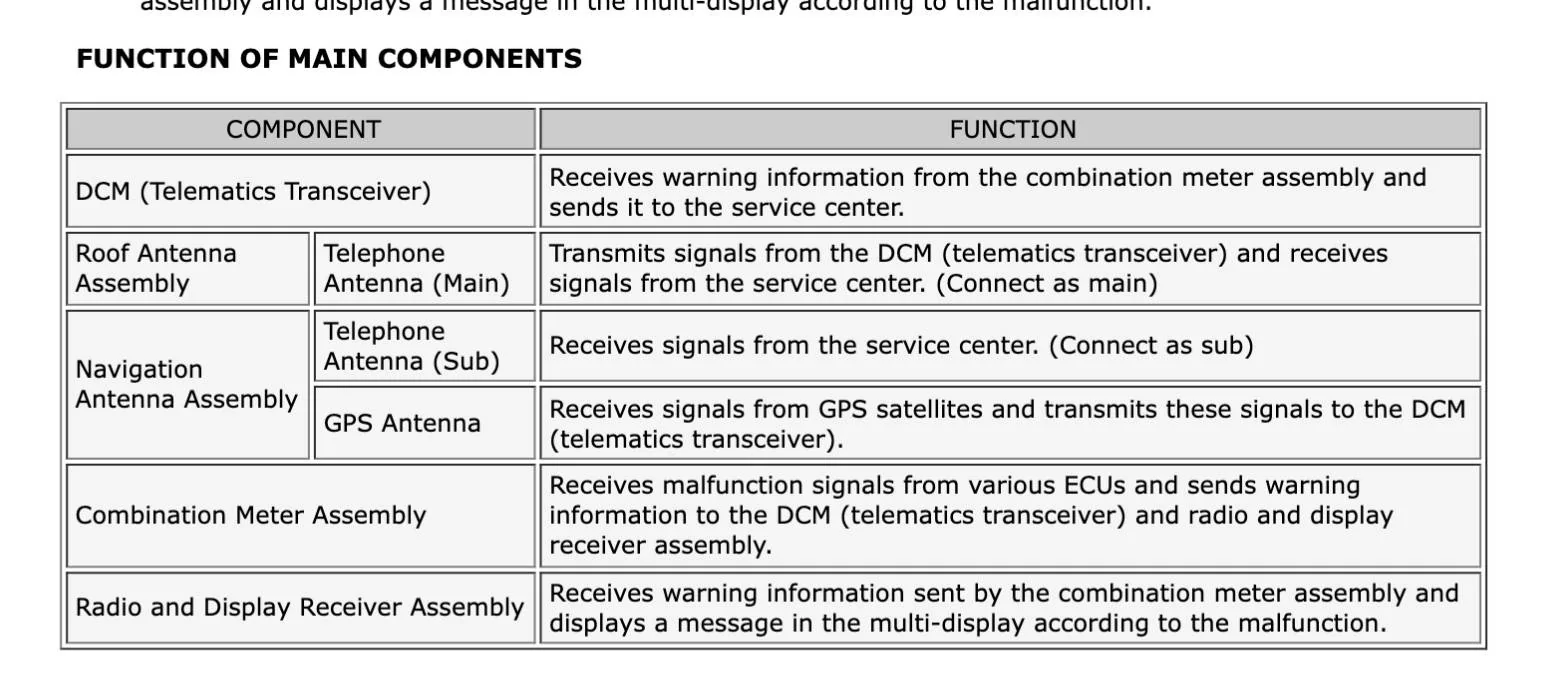
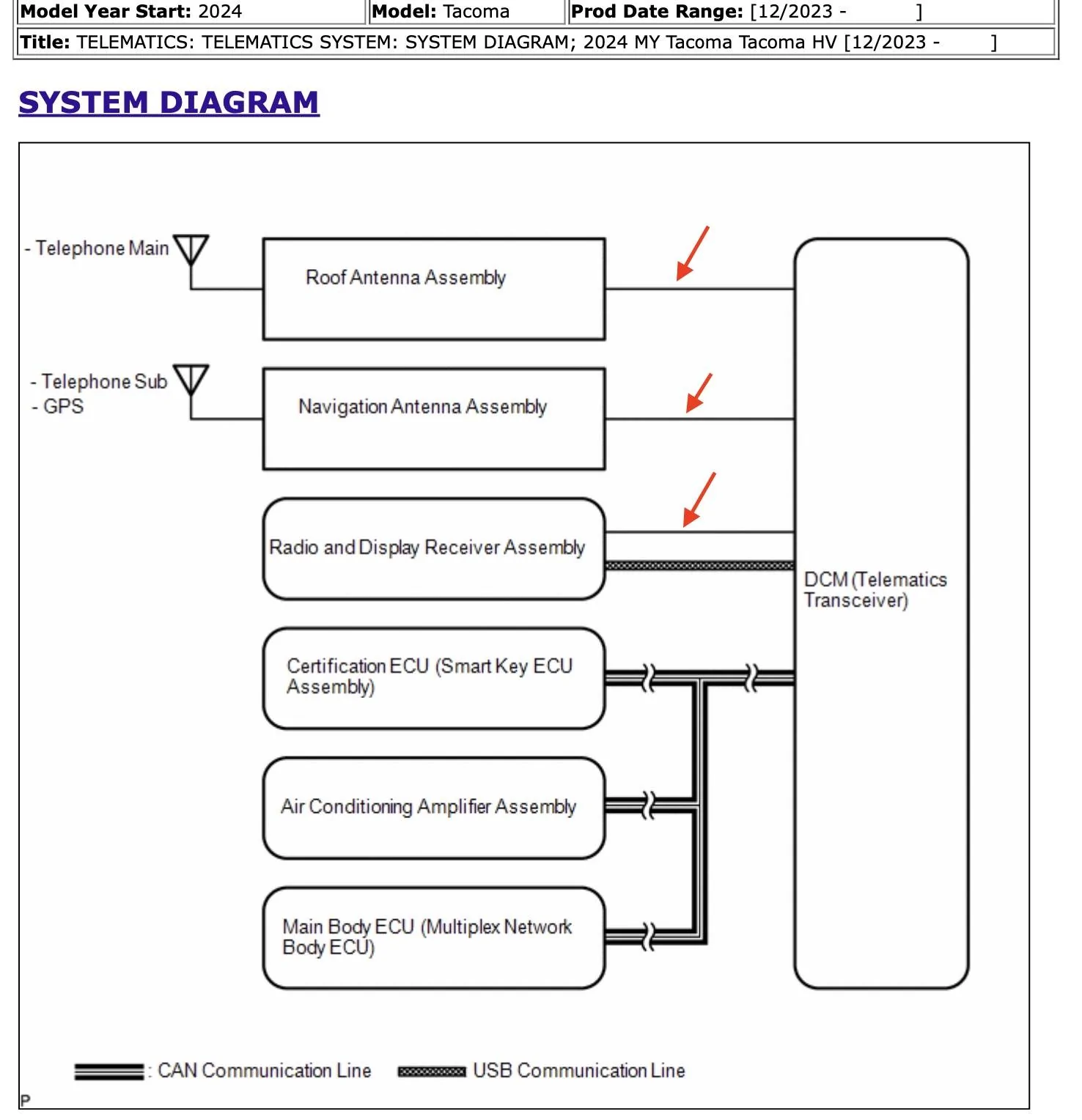
I Refer you to the 2024 service manual where it says:

aaaa.webp


bbbb.webp


The HOW-TO for those interested:

I know that on other Toyota models, pulling the DCM fuse results in a Check Engine Light. I Haven't tested this on my Taco; but i don't want a bogus CEL masking other legit causes for CEL. So i looked for a method to keep DCM communicating to ECU but not the outside world.

After some research I found this thread. This method takes less than 15 minutes and is completely reversable. Basically unplugging three oem cables and plugging in three terminated dummy cables which tell the DCM it's out of range for cellular and GPS. This does NOT affect any other cellular or GPS devices you might have in the vehicle.

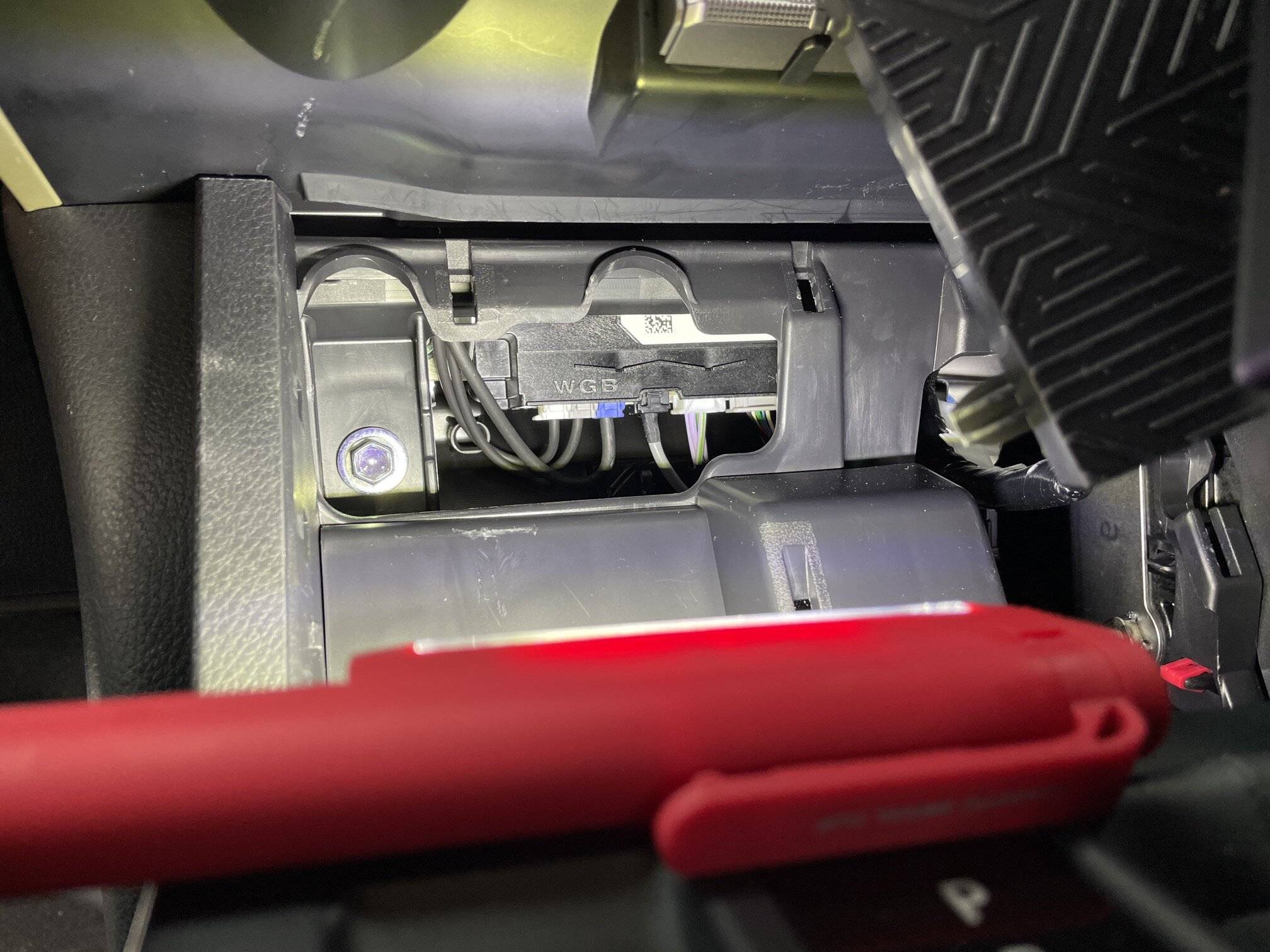
First, I looked up the location of the DCM module in my 2025 Taco. It's behind the phone shelf/charging area just ahead of the shifter.

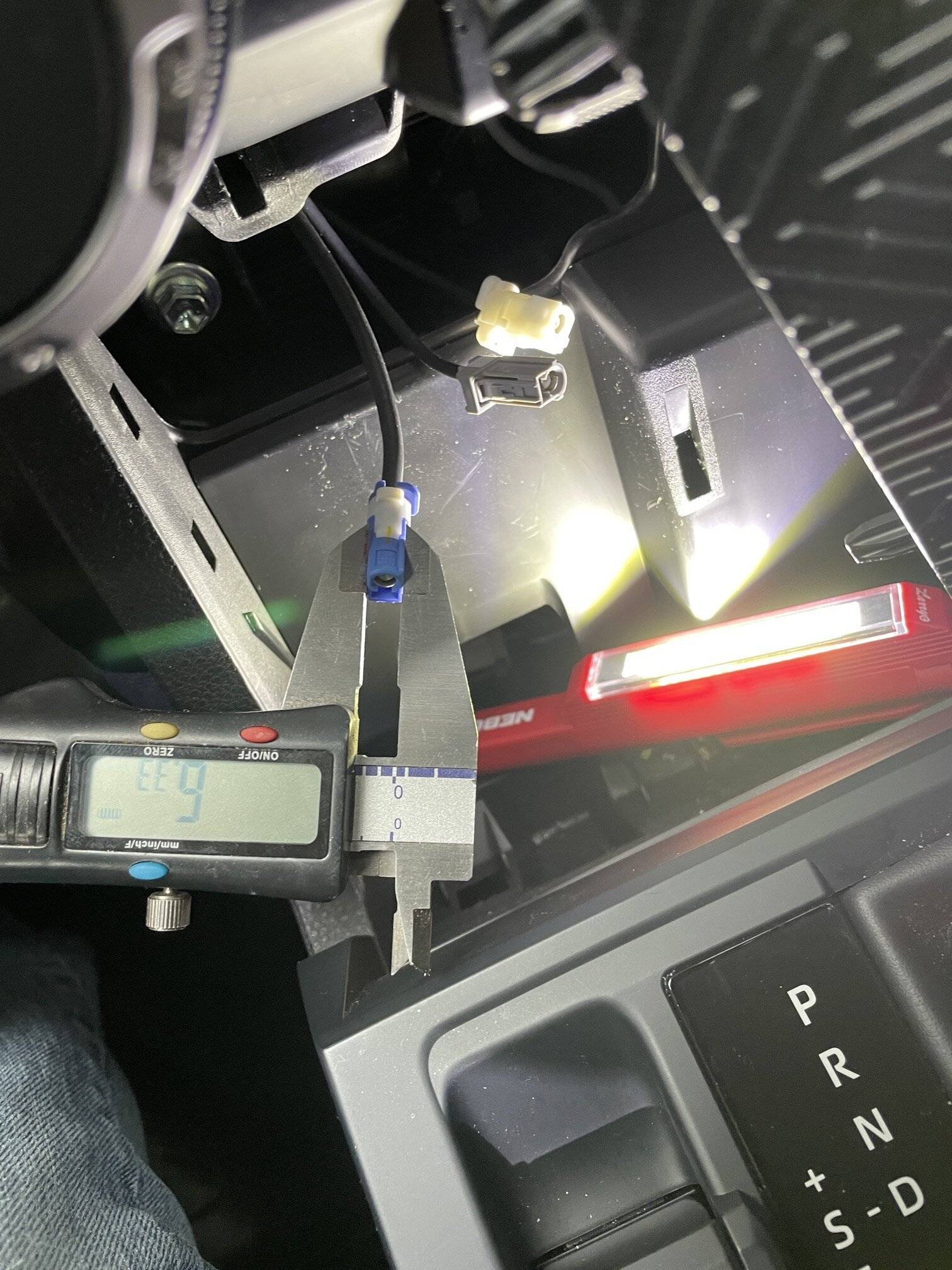
I purchased three 'Fakra Z Female to SMA Female Vehicle Antenna Adapter cables' and some 50-ohm SMA terminators off Amazon. The square Fakra Z shells on the jumper cables need to be removed leaving just the inner coax connector, becuase the Fakra shells are are too Fakrin' wide to fit into the Toyota DCM. Do this carefully so as not to damage or bend the inner coax connector fins.


Accessing the DCM is easy; the panel holding the phone shelf/Qi charger basially pops forward and unclips. Once loose it can be pivoted to the right allowing acess to guts of the console. The DCM is front and center.

1_IMG_8358.JPG
3_IMG_8360.JPG


The antenna leads are on the left:


ant.webp


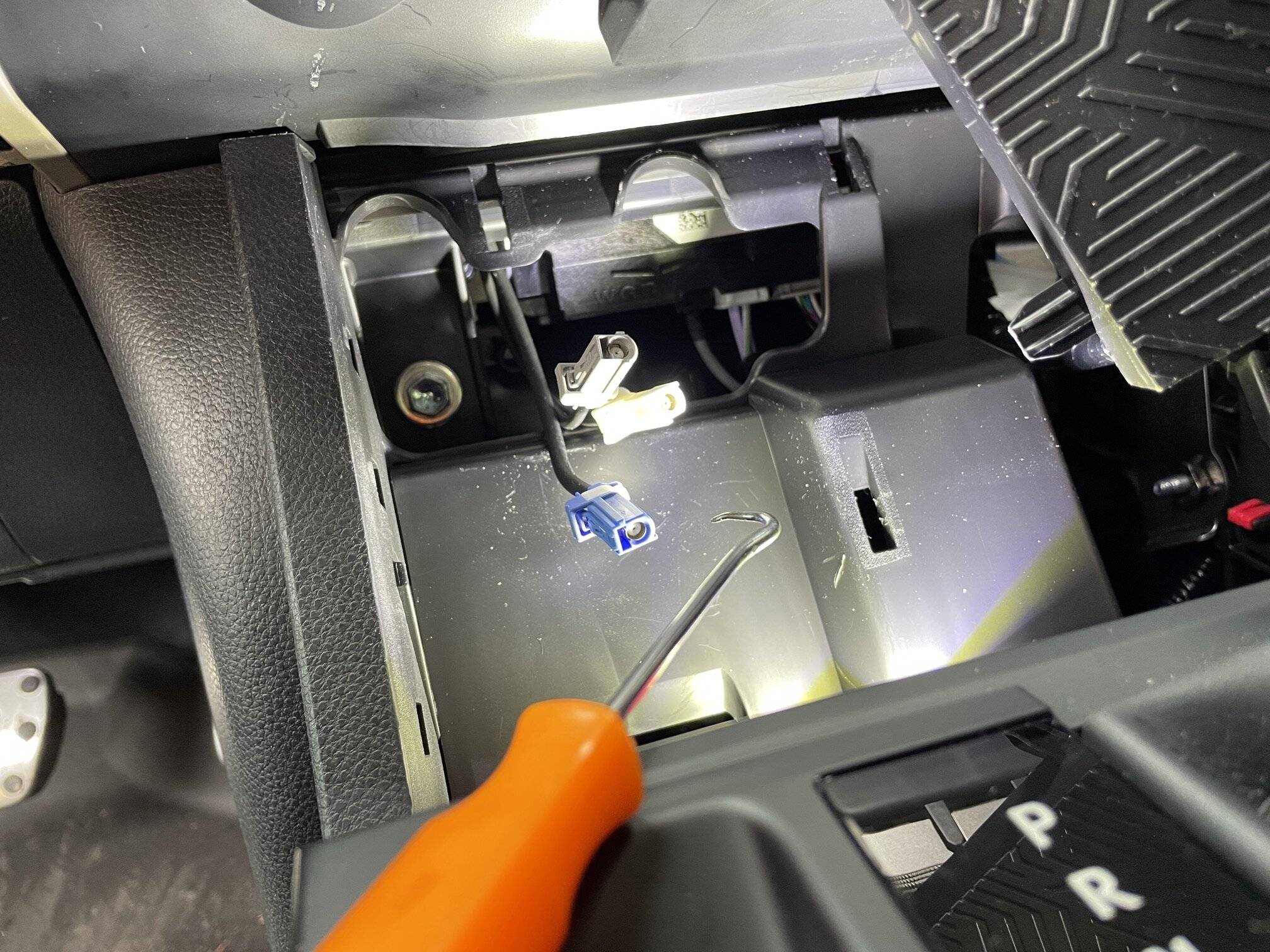
The latches for the connectors are at the front. I suggest using a right-angle tool such as a pick to push the latches inwards while tugging gently on the cables. They pop out easily.


5_IMG_8363.JPG


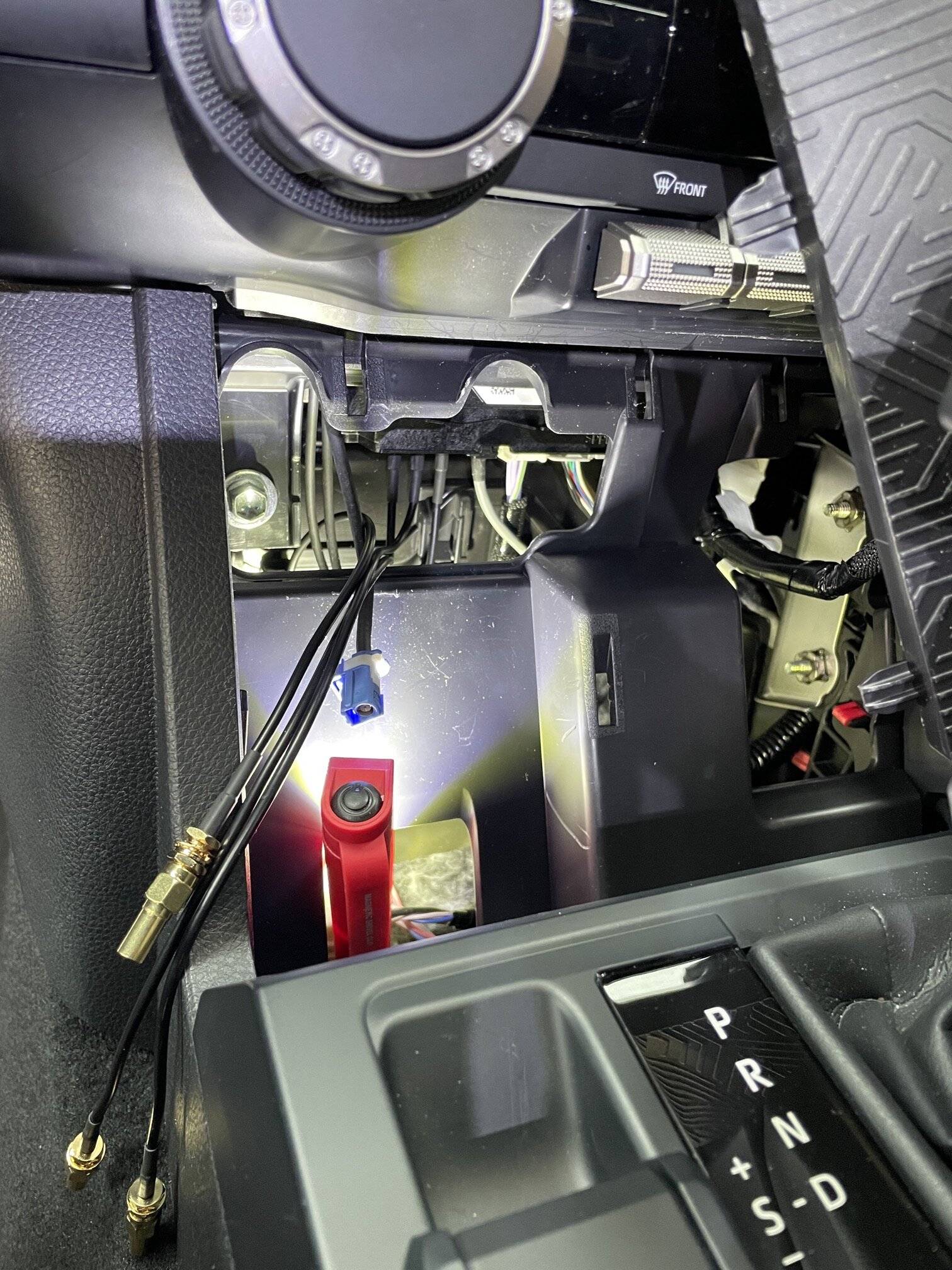
Install the terminated jumpers into the three DCM sockets you just freed up. The connectors have a slight interference fit so they won't easily fall out.

8_IMG_8368.JPG


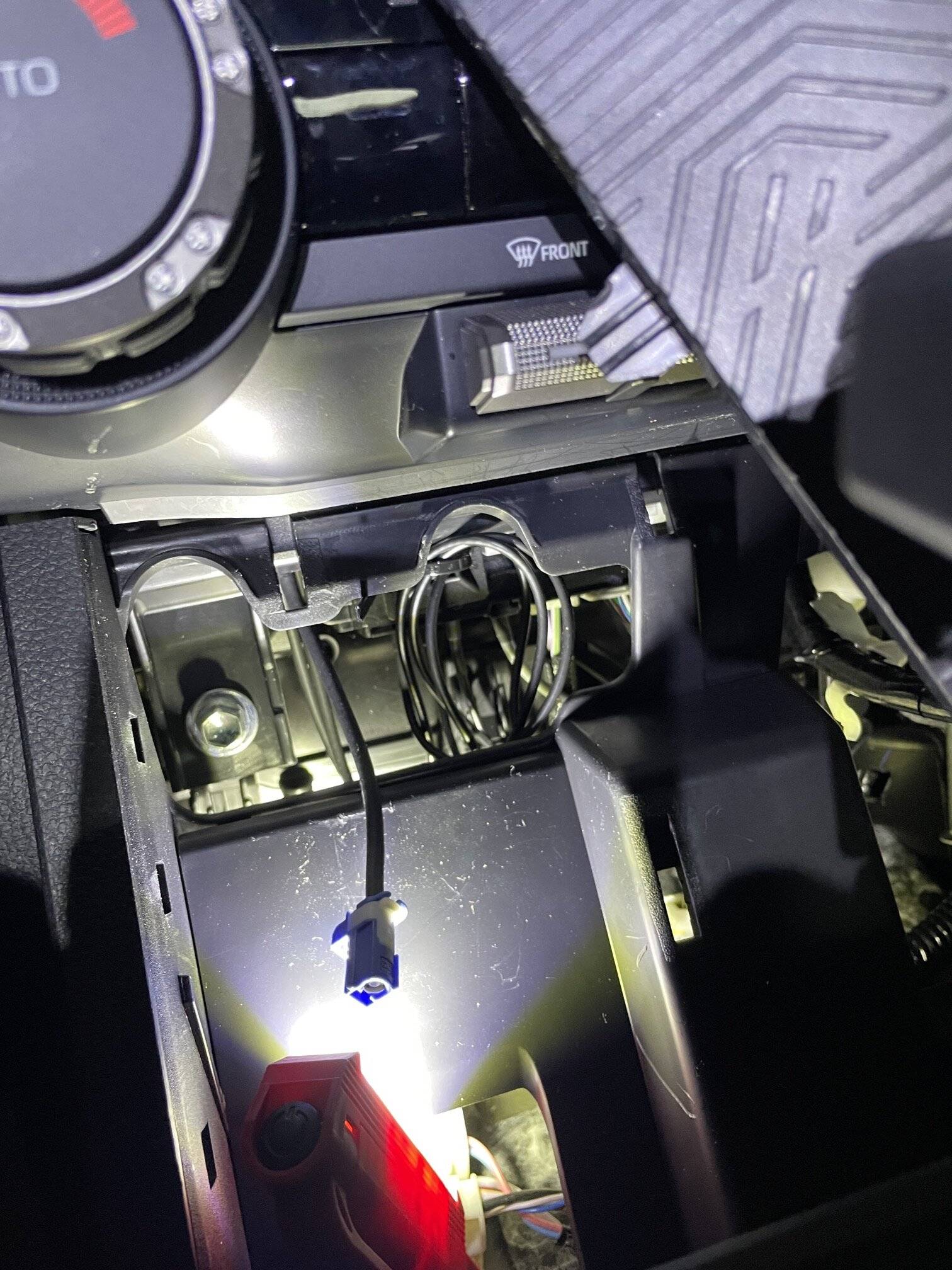
You could probably? just let the jumpers dangle in the dash area but i wanted to take their weight off the interference-fit coax connectors at the DCM side. So I used an ahdesive-backed zip-tie mount and a zip tie stuck right to the front of the DCM, through wich i looped the three new jumper cables. Now there is no weight pulling down on the connectors landed in the DCM.

9_final.jpg


I Pushed the three OEM cables back into the dash and let them dangle.

I started the truck at this point to check for any CELs... no problems found.

Reinstall the phone shelf/carger plate in reverse sequence. Start the bottom with the vertical fin connectors.

That's all there is to it. At this point the DCM will this it is out of range for both cellular and GPS.

Note: the OEM "emergency assistance"button and other "connected services" are now diabled, obvi, as it requres that built-in cellular link. I infer that pulling the onboard GPS antenna also functionally blinds the onboard oem navigation. If you use onboard oem Nav, the you could experiment with reconnecting the GPS antenna only I guess? YMMV.

This will NOT affect any carplay, cellular or GPS accessed via a paired smartphone.

7_IMG_8365.JPG
Posting a how-to on grounding out the antennas used by the DCM telematics module.

This post is not a debate about the puposes of telematics communicating data back to a toyota service center ,or legality of same -- only a how-to for those interested.

Background - why bother?
- All recent toyotas have a always-on cellular connection to Toyota corporate via thee internet. This enables lots of data reporting and remote monitoring & control of the vehicle. This includes GPS location, speed and other data. Maybe you don't care, maybe you feel the pros of being connected outweight the cons; but some people don't want this data being sent at all.

What data gets sent?
I Refer you to the 2024 service manual where it says:

aaaa.jpg


bbbb.jpg


The HOW-TO for those interested:

I know that on other Toyota models, pulling the DCM fuse results in a Check Engine Light. I Haven't tested this on my Taco; but i don't want a bogus CEL masking other legit causes for CEL. So i looked for a method to keep DCM communicating to ECU but not the outside world.

After some research I found this thread. This method takes less than 15 minutes and is completely reversable. Basically unplugging three oem cables and plugging in three terminated dummy cables which tell the DCM it's out of range for cellular and GPS. This does NOT affect any other cellular or GPS devices you might have in the vehicle.

First, I looked up the location of the DCM module in my 2025 Taco. It's behind the phone shelf/charging area just ahead of the shifter.

I purchased three 'Fakra Z Female to SMA Female Vehicle Antenna Adapter cables' and some 50-ohm SMA terminators off Amazon. The square Fakra Z shells on the jumper cables need to be removed leaving just the inner coax connector, becuase the Fakra shells are are too Fakrin' wide to fit into the Toyota DCM. Do this carefully so as not to damage or bend the inner coax connector fins.


Accessing the DCM is easy; the panel holding the phone shelf/Qi charger basially pops forward and unclips. Once loose it can be pivoted to the right allowing acess to guts of the console. The DCM is front and center.

1_IMG_8358.JPG
3_IMG_8360.JPG


The antenna leads are on the left:


ant.jpg


The latches for the connectors are at the front. I suggest using a right-angle tool such as a pick to push the latches inwards while tugging gently on the cables. They pop out easily.


5_IMG_8363.JPG


Install the terminated jumpers into the three DCM sockets you just freed up. The connectors have a slight interference fit so they won't easily fall out.

8_IMG_8368.JPG


You could probably? just let the jumpers dangle in the dash area but i wanted to take their weight off the interference-fit coax connectors at the DCM side. So I used an ahdesive-backed zip-tie mount and a zip tie stuck right to the front of the DCM, through wich i looped the three new jumper cables. Now there is no weight pulling down on the connectors landed in the DCM.

9_final.jpg


I Pushed the three OEM cables back into the dash and let them dangle.

I started the truck at this point to check for any CELs... no problems found.

Reinstall the phone shelf/carger plate in reverse sequence. Start the bottom with the vertical fin connectors.

That's all there is to it. At this point the DCM will this it is out of range for both cellular and GPS.

Note: the OEM "emergency assistance"button and other "connected services" are now diabled, obvi, as it requres that built-in cellular link. I infer that pulling the onboard GPS antenna also functionally blinds the onboard oem navigation. If you use onboard oem Nav, the you could experiment with reconnecting the GPS antenna only I guess? YMMV.

This will NOT affect any carplay, cellular or GPS accessed via a paired smartphone.

7_IMG_8365.JPG
Fantastic info, thanks for sharing. I opted out of Toyota telematics shortly after purchasing the truck, but will be doing this as well since I don't have full faith the the opt-out will be fully honored long term.
Fantastic info indeed, and this method does not need AHH bypass, so BT microphone and Rt Side front speaker will not get broke.
 

fredygump

SR5
Active member
First Name
Darren
Joined
Aug 1, 2026
Threads
4
Messages
28
Reaction score
27
Location
Minnesota
Vehicle(s)
2026 Tacoma SR5, 2016 VW GTI
Just FYI, all speakers and hands free microphone are working 100% for on my 2026 SR5, using the Autoharnesshouse kit. The best way to test is by making a phone call, I think.


AHH bypass only partially worked for me. 2025 Camry hybrid awd
Given you have a Camry and are posting in a Tacoma forum, it is anyone's guess if yours works the same! But the antenna shorting method will kill the transmission of data, so it will work on any vehicle, if you can locate the DCM.
Sponsored


Top