
Sponsored

Tire pressure screen reset - when will there be a TSB?

stuckinsocal

TRD Off-Road Premium
Well-known member
Joined
Mar 5, 2025
Threads
1
Messages
126
Reaction score
90
Location
SoCal
Vehicle(s)
24 TRD OR 6MT
Race condition? You a dev too? Lol
Learned / did some of it in college; however ended up on the systems / networking / admin side. What I did learn has been helpful from time to time on various projects, and of course while my SQL is rusty having a foundation is good when troubleshooting or upgrading / installing even if a lot of the time the software wraps everything up in a nice gui for administrators.

My heart goes out to my dev buddies in these trying times though.
Sponsored
 

Baltimore

Well-known member
Joined
Jul 23, 2024
Threads
29
Messages
676
Reaction score
380
Location
Maryland
Vehicle(s)
4g hybrid
I think engine running and parking brake on could possibly be part of it - I say this because once fixed if you release the parking brake (or go into drive) before the widgets load it will revert to this behavior. However if you change it back to the TPMS and next time you start you wait for it to load, it will stay "fixed".

To explain it another way; once the fix is applied it has been permanent, however for it to work the way we want to you have to wait for the widgets to load before taking it out of park or releasing the parking brake (I'm in the 6MT so only parking brake for me). It only takes a second but it is a critical step; I find it good to let the oil flow for a second anyway before I move my truck.

So if you are so inclined give it a try with those factors changed (engine on, park brake set) - I know this worked for at least me and one other person - but I'm hoping others have had success that just didn't post (which is fine) and I'm hoping you get it fixed as well. I'll be happy to support if you have any other questions or want to bounce ideas off.
Alright, will need more precise instructions since it's not coming together for me.

Which "reset" (explicitly by menu location) did you use? There are two, if not three of them buried in the infotainment. And each one does various levels of resetting, but mine doing a total "wipe".

Here's what I just re-tried:
Engine running
Parking brake set
Info & security | System reset
Gauges didn't change, but lost mpg and clock changed to Hawaii time and app notified me I was now removed from the vehicle
Re-paired vehicle via Toyota App, gauges reset upon load
"Welcome" message on infotainment
Set gauges (left Bluetooth prompt pending)
Paired BT
Linked key
Already knew profile.. no re-add
Once profile loading message disappeared, unset parking brake and started a drive
Stopped at a store, no parking set
Came back out, started up and waited
Gauge was rolled back over to Trip B
 

bsquaredMTB

TRD Off-Road Premium
Well-known member
First Name
Ben
Joined
Mar 10, 2024
Threads
48
Messages
525
Reaction score
405
Location
El Paso, TX
Vehicle(s)
2024 Tacoma TRD Off-Road Premium
For what it's worth, assuming you get this working, I have noticed that once it works, it does tend to disappear if you shift out of park before everything loads up. That being said, the next time you start the truck and wait for it to load it does apply successfully without any further intervention. This is my experience with it. Hopefully others see the same thing.
 

Baltimore

Well-known member
Joined
Jul 23, 2024
Threads
29
Messages
676
Reaction score
380
Location
Maryland
Vehicle(s)
4g hybrid
For what it's worth, assuming you get this working, I have noticed that once it works, it does tend to disappear if you shift out of park before everything loads up. That being said, the next time you start the truck and wait for it to load it does apply successfully without any further intervention. This is my experience with it. Hopefully others see the same thing.
Do you recall your exact steps? and which screens it was?

Are you having to set / unset your parking brake every single time?
 

bsquaredMTB

TRD Off-Road Premium
Well-known member
First Name
Ben
Joined
Mar 10, 2024
Threads
48
Messages
525
Reaction score
405
Location
El Paso, TX
Vehicle(s)
2024 Tacoma TRD Off-Road Premium
Do you recall your exact steps? and which screens it was?

Are you having to set / unset your parking brake every single time?
These were my exact steps. I'm not having to manually do anything with the parking brake at all. One test I've done is starting the truck with the screen where I set the PSI (in my case screen 2) as the first screen I look at. I notice that it first comes up with the Trip B screen (the default) but then once my profile is applied, it switches to the PSI screen. There's definitely a bug in the code that causes that not to happen if you switch away from park too quick, but that's probably never going to get fixed by Toyota

It's working now! Thank you for all the support and information, @stuckinsocal! I think the key was the infotainment reset. Here's the order that worked for me:
1. Removed primary profile in infotainment system and in the app
2. Set up connected services in app
3. Reconnected to the infotainment system (tire pressure display did not work at this point)
4. Reset the infotainment system
5. Set the screens like I wanted them, including the tire pressure screen on the second page right hand display
Reconnected my phone with Bluetooth
6. Selected the primary user again and activated it with my 6 digit pin
7. Turned off the truck for a few hours
8. Turned the truck back on and it stuck!

Note that I did this all while the truck was in park and running fully.

Also I have noticed that, if I shift out of park before the infotainment system connects, the tire pressure monitor screen goes away. Maybe that's part of the issue. Anyone else seen that?
 
Last edited:

Sponsored

stuckinsocal

TRD Off-Road Premium
Well-known member
Joined
Mar 5, 2025
Threads
1
Messages
126
Reaction score
90
Location
SoCal
Vehicle(s)
24 TRD OR 6MT
Alright, will need more precise instructions since it's not coming together for me.

Which "reset" (explicitly by menu location) did you use? There are two, if not three of them buried in the infotainment. And each one does various levels of resetting, but mine doing a total "wipe".

Here's what I just re-tried:
Engine running
Parking brake set
Info & security | System reset
Gauges didn't change, but lost mpg and clock changed to Hawaii time and app notified me I was now removed from the vehicle
Re-paired vehicle via Toyota App, gauges reset upon load
"Welcome" message on infotainment
Set gauges (left Bluetooth prompt pending)
Paired BT
Linked key
Already knew profile.. no re-add
Once profile loading message disappeared, unset parking brake and started a drive
Stopped at a store, no parking set
Came back out, started up and waited
Gauge was rolled back over to Trip B
I think the difference between you and me is the reset I used wiped my gauge cluster settings and infotainment settings. IIRC it is the same one you mentioned but it for sure changed my gauge layout back to default (I had it on casual or w/e and it changed it back to the default "tough" style - I also had it on single gauge and it went back to double). I think having the gauge cluster reset was a part of the fix potentially.

After reset, I set the gauges I wanted before doing anything with my phone. No profiles, no anything. With the gauges set I added my phone, via the infotainment and bluetooth (I also plugged into the vehicle using USB not not sure if that did anything) and put in my phone pin. I didn't initiate pairing from the app itself, but the infotainment. When I did it that way it did NOT reset my gauges after pairing my phone / profile.

I hope this helps, and good luck.
 

Baltimore

Well-known member
Joined
Jul 23, 2024
Threads
29
Messages
676
Reaction score
380
Location
Maryland
Vehicle(s)
4g hybrid
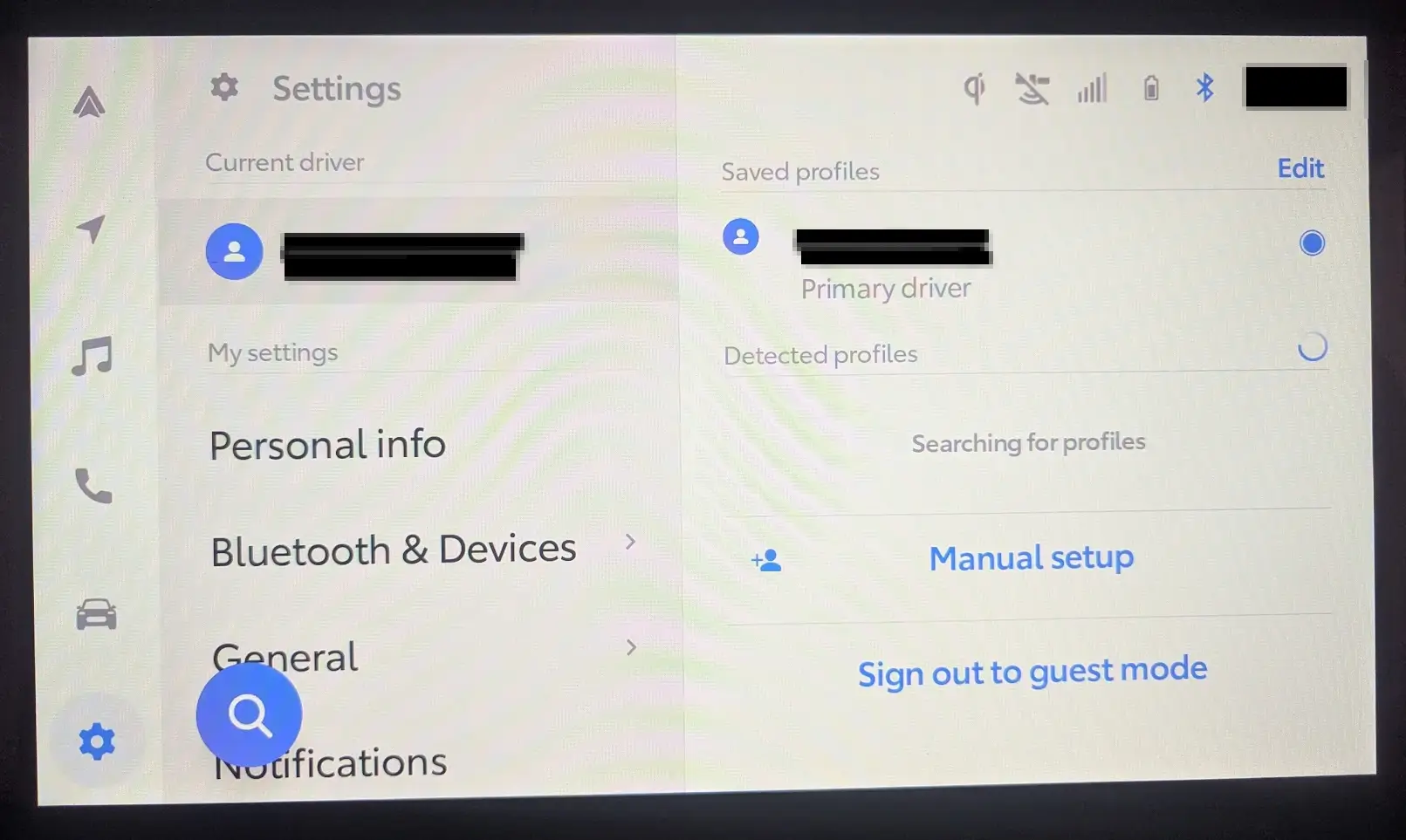
I didn't see any profile before, however after I did the steps outlined in my post this is what you should see. I did this by having the Toyota app linked to my truck (via inputting my VIN into the app I think; I set it up a long time ago), and accepting the connected services EULA. You should have 10 years of 2 "trials". Service and safety connect. I had the app open and started my truck; I also connected it to USB but that may or may not be needed. The truck did take some time after I accepted the EULA to link up with Toyota and activate the system. You may get a female voice from the infotainment telling you activation is successful or something like that.


1781833508574-od.webp

@maxx075 This is what I was talking about in regards to profiles.
Do you remember, when you activated services, if you accepted or declined the "dealer service connect" and the "insure connect"? again, trying to isolate all the variants.
 

stuckinsocal

TRD Off-Road Premium
Well-known member
Joined
Mar 5, 2025
Threads
1
Messages
126
Reaction score
90
Location
SoCal
Vehicle(s)
24 TRD OR 6MT
Do you remember, when you activated services, if you accepted or declined the "dealer service connect" and the "insure connect"? again, trying to isolate all the variants.
I declined. When resetting your infotainment does the dash reset as well? When you add your phone; do you do it from the infotainment via bluetooth?
 

Baltimore

Well-known member
Joined
Jul 23, 2024
Threads
29
Messages
676
Reaction score
380
Location
Maryland
Vehicle(s)
4g hybrid
Alright. Tried it again. No success, has rolled back to Trip B when I got in the truck 5 hours later.

Tacoma TPMS Reset
Engine running, in park, parking brake set

Settings, Personal Info, Reset settings
"Updating"... Zero changes observed

- Remove Profile
Dash now reset
Current driver = guest

Tap guest, tap get started
Scan VIN in App
Scan QR
"Activate vehicle"
"Service Connect Communication" declined
"Insure Connect" declined
"Wi-Fi Connect" AT&T declined
(Error received "try again later")
Vehicle not activated

Paired Bluetooth
Allowed AA
Vehicle knows my app profile name (even though error on previous step)

On MID= settings, meter settings, default settings, confirm factory reset
"Factory settings restored"

Set meters and gauges as desired

"Sign out to guest mode"
Guest mode active

Tap to re-use my profile
Pin prompt
"Welcome, settings loading"
(App now showed services active and vehicle linked, even though error earlier "services already active")
Shut truck off
 

bsquaredMTB

TRD Off-Road Premium
Well-known member
First Name
Ben
Joined
Mar 10, 2024
Threads
48
Messages
525
Reaction score
405
Location
El Paso, TX
Vehicle(s)
2024 Tacoma TRD Off-Road Premium
Alright. Tried it again. No success, has rolled back to Trip B when I got in the truck 5 hours later.

Tacoma TPMS Reset
Engine running, in park, parking brake set

Settings, Personal Info, Reset settings
"Updating"... Zero changes observed

- Remove Profile
Dash now reset
Current driver = guest

Tap guest, tap get started
Scan VIN in App
Scan QR
"Activate vehicle"
"Service Connect Communication" declined
"Insure Connect" declined
"Wi-Fi Connect" AT&T declined
(Error received "try again later")
Vehicle not activated

Paired Bluetooth
Allowed AA
Vehicle knows my app profile name (even though error on previous step)

On MID= settings, meter settings, default settings, confirm factory reset
"Factory settings restored"

Set meters and gauges as desired

"Sign out to guest mode"
Guest mode active

Tap to re-use my profile
Pin prompt
"Welcome, settings loading"
(App now showed services active and vehicle linked, even though error earlier "services already active")
Shut truck off
Maybe try resetting the MID first before you do the infotainment stuff?
 

Sponsored

stuckinsocal

TRD Off-Road Premium
Well-known member
Joined
Mar 5, 2025
Threads
1
Messages
126
Reaction score
90
Location
SoCal
Vehicle(s)
24 TRD OR 6MT
Alright. Tried it again. No success, has rolled back to Trip B when I got in the truck 5 hours later.

Tacoma TPMS Reset
Engine running, in park, parking brake set

Settings, Personal Info, Reset settings
"Updating"... Zero changes observed

- Remove Profile
Dash now reset
Current driver = guest

Tap guest, tap get started
Scan VIN in App
Scan QR
"Activate vehicle"
"Service Connect Communication" declined
"Insure Connect" declined
"Wi-Fi Connect" AT&T declined
(Error received "try again later")
Vehicle not activated

Paired Bluetooth
Allowed AA
Vehicle knows my app profile name (even though error on previous step)

On MID= settings, meter settings, default settings, confirm factory reset
"Factory settings restored"

Set meters and gauges as desired

"Sign out to guest mode"
Guest mode active

Tap to re-use my profile
Pin prompt
"Welcome, settings loading"
(App now showed services active and vehicle linked, even though error earlier "services already active")
Shut truck off


Settings, Personal Info, Reset settings
"Updating"... Zero changes observed

- Remove Profile
Dash now reset
Current driver = guest


This part seems off. I'm going to poke around in my truck and see which setting I clicked but the infotainment one should reset the dash too for it to work.
 

stuckinsocal

TRD Off-Road Premium
Well-known member
Joined
Mar 5, 2025
Threads
1
Messages
126
Reaction score
90
Location
SoCal
Vehicle(s)
24 TRD OR 6MT
Alright. Tried it again. No success, has rolled back to Trip B when I got in the truck 5 hours later.

Tacoma TPMS Reset
Engine running, in park, parking brake set

Settings, Personal Info, Reset settings
"Updating"... Zero changes observed

- Remove Profile
Dash now reset
Current driver = guest

Tap guest, tap get started
Scan VIN in App
Scan QR
"Activate vehicle"
"Service Connect Communication" declined
"Insure Connect" declined
"Wi-Fi Connect" AT&T declined
(Error received "try again later")
Vehicle not activated

Paired Bluetooth
Allowed AA
Vehicle knows my app profile name (even though error on previous step)

On MID= settings, meter settings, default settings, confirm factory reset
"Factory settings restored"

Set meters and gauges as desired

"Sign out to guest mode"
Guest mode active

Tap to re-use my profile
Pin prompt
"Welcome, settings loading"
(App now showed services active and vehicle linked, even though error earlier "services already active")
Shut truck off

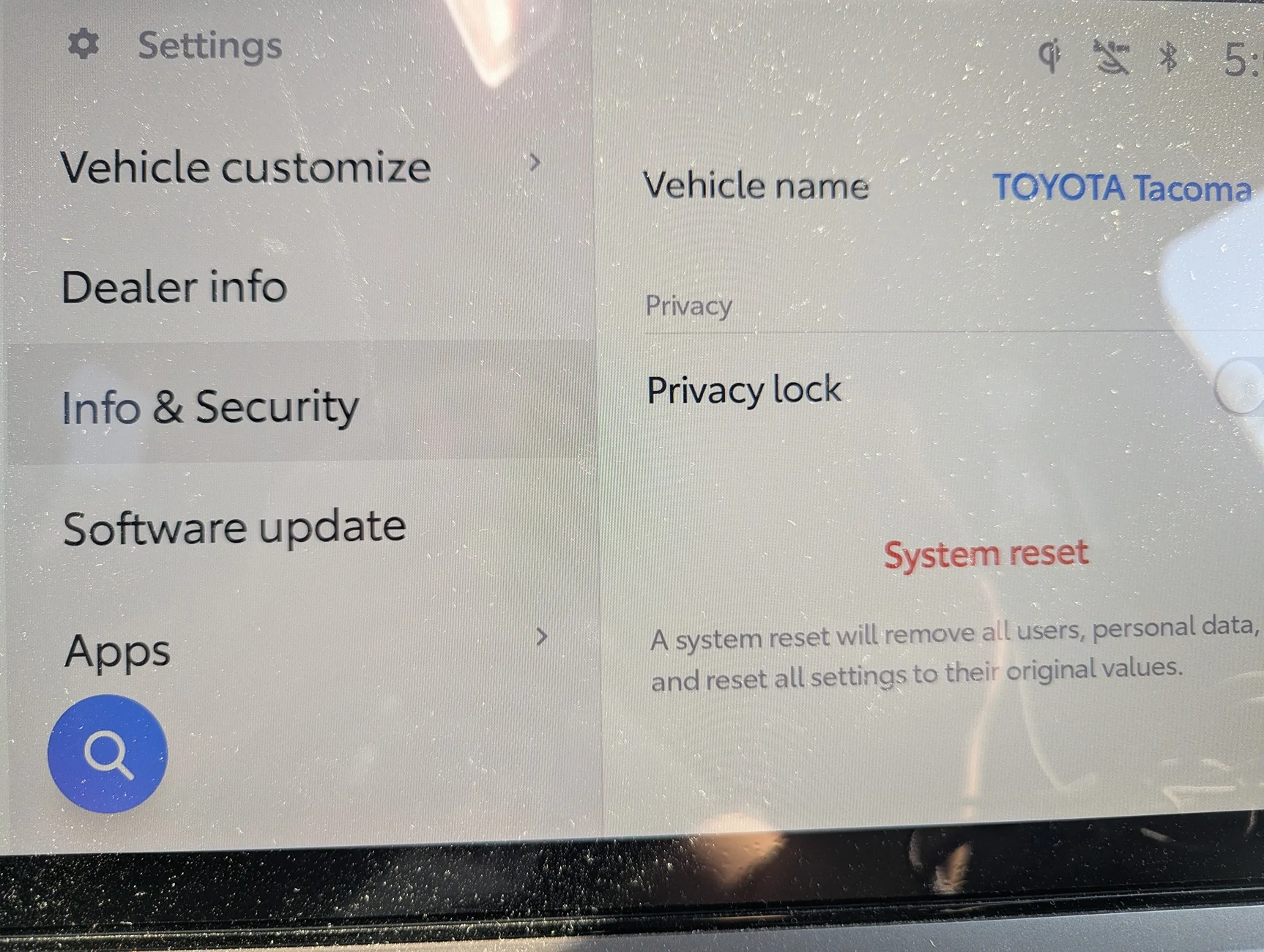
This is the setting I used. It should clear everything, including the dash. @bsquaredMTB if you recall did you use this one as well?

The "remove personal info" one that doesn't reset the dash doesn't sound like the right step to me.

PXL_20260723_000118942.webp
 

bsquaredMTB

TRD Off-Road Premium
Well-known member
First Name
Ben
Joined
Mar 10, 2024
Threads
48
Messages
525
Reaction score
405
Location
El Paso, TX
Vehicle(s)
2024 Tacoma TRD Off-Road Premium
This is the setting I used. It should clear everything, including the dash. @bsquaredMTB if you recall did you use this one as well?

The "remove personal info" one that doesn't reset the dash doesn't sound like the right step to me.

PXL_20260723_000118942.webp
Yep. I remember doing this too.
 

Baltimore

Well-known member
Joined
Jul 23, 2024
Threads
29
Messages
676
Reaction score
380
Location
Maryland
Vehicle(s)
4g hybrid
@stuckinsocal @bsquaredMTB

Still doing something different. I did the following the other day, but sure enough when I got in the truck the next morning, it had rolled back to Trip B and never put itself back even after the truck had said the profile was loaded.

  1. Engine running, in park, parking brake active
  2. Settings | Profiles, delete primary user
  3. screen reverts to "Guest - Get Started"
  4. Re-link vehicle via VIN/QR code, select "activate"
  5. Vehicle reports "all set", click "complete"
  6. When prompted to set up Bluetooth, selected "No"
  7. Setting | Info | Security, system reset = yes
  8. confirm for system reset
    1. This immediate de-linked the vehicle and associated account from steps 4/5
  9. Vehicle screen returns to Guest - Link Vehicle prompt
    1. Selected to "cancel setup"
    2. Message box with "profile not saved"
  10. Prompted to pair mobile device, selected "No"
  11. Left infotainment on Profile screen and began to configure the MID
    1. As I was moving around the MID menus, the vehicle infotainment refreshed and showed my old profile name
  12. Configured Gauge settings first, and configured Dials settings second
    1. On MID screen 1
      1. Allowed all dials to be permitted on left side (this pertains to all screens)
      2. Configured MID 1 (navigation left, fuel economy right)
    2. On MID screen 2
      1. Allowed all dials to be permitted on right side (this pertains to all screens)
      2. Configured MID 2 (trip A left, current drive right)
    3. On MID screen 3
      1. Configured MID 3 (trip B left, TPMS right)
  13. Connect Bluetooth, confirm pair, allow Android Auto
  14. On Infotainment, tap to Profile
    1. Noticed a "SAVE" text next to profile name
    2. Tapped it / profile name
    3. Prompted to confirm save (have never seen this before)
    4. Selected "Continue"
    5. Screen flips to "Get Started - Link Vehicle" prompts
      1. Have to perform entire VIN/QR link again, activate, decline additional
      2. Receive "All Set" / completed prompt
    6. Prompted to set up Bluetooth, selected "Yes"
  15. Powered truck off
  16. Powered truck back on
    1. All MID displays are back at defaults
    2. Configured everything again per Step 12 above
  17. Within Settings | Personal Info
    1. No devices linked
    2. No key linked
    3. (YET, I get the "welcome... profile loading" message on start up)
  18. Powered truck off
  19. Powered truck back on ~10 min later
  20. Did not auto-find my profile this time (full cold shutdown), displayed "Guest" as active profile
  21. Tapped my saved profile name, prompted me for my PIN
  22. Entered PIN and received "welcome... profile loading"
  23. Powered truck off
  24. Powered truck back on < 10 min later
  25. "Profile loading"
  26. Powered truck off, waited overnight
  27. Powered truck on, "Guest" loaded
  28. Tapped my profile, entered PIN
    1. dials remained rolled over to Trip B, not TPMS
  29. Activated device linked to profile and key linked to profile
  30. Powered truck off, waited overnight
  31. Powered truck on, my profile loaded
  32. Dial remained rolled over to Trip B
    1. Few more drives in and still, even if I want in park (with or without parking brake set) for multiple minutes, never loads dial back to TPMS
 

maxx075

TRD Off-Road
Well-known member
Joined
Apr 24, 2024
Threads
6
Messages
1,179
Reaction score
1,414
Location
FL
Vehicle(s)
2024 TRD Off Road
Does anybody else think ^^^^^^^ all of this is incredibly stupid? Or is just me?
Sponsored


Top